
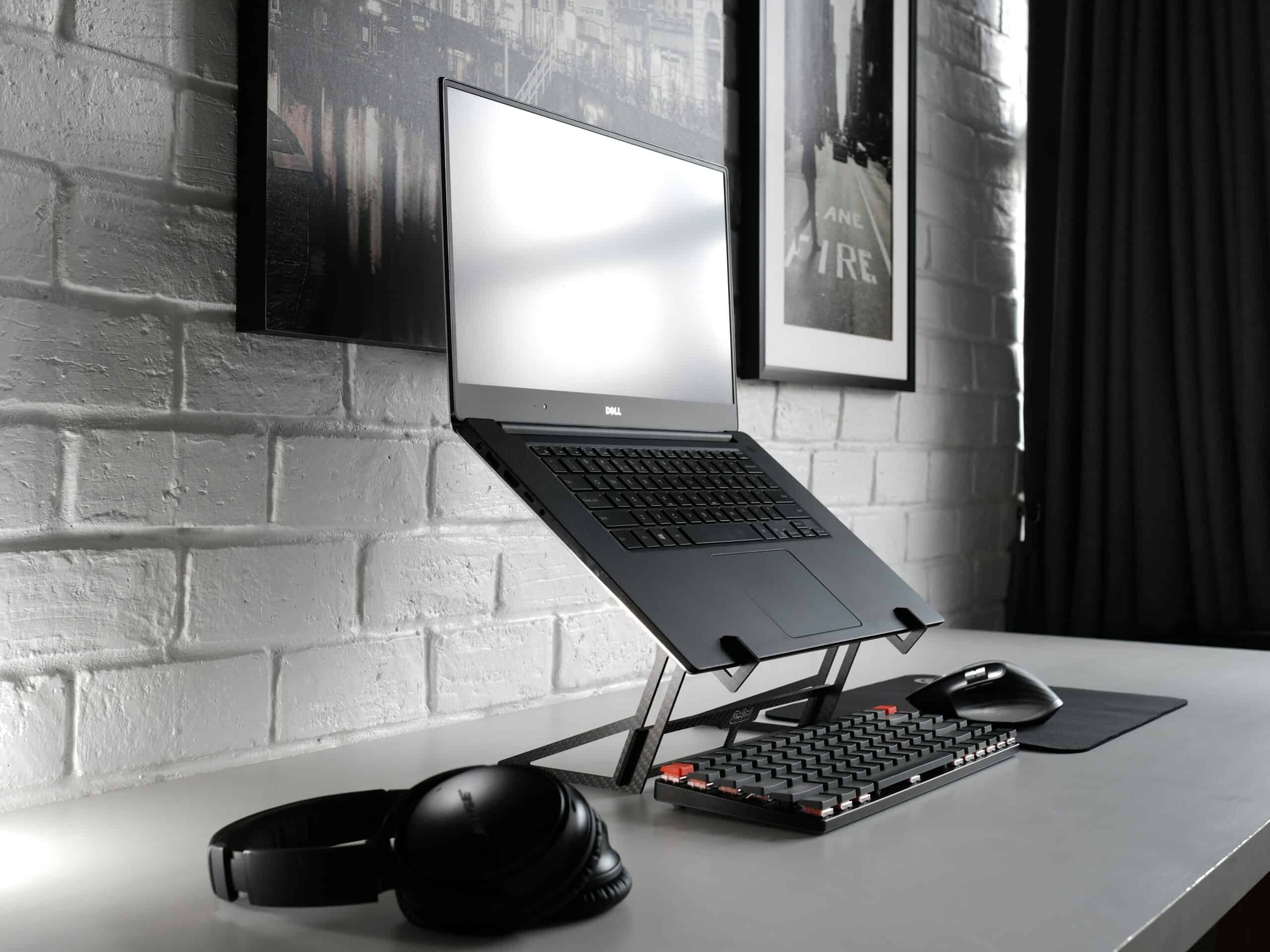
A screen sitting below eye level pulls your head forward and holds it there for every hour you work. The best monitor arms and laptop stands for screen height fix the one workstation variable that published ergonomics guidance names first and that almost nobody adjusts, because a low screen loads the neck no matter how good the chair is. Adjustability range matters more than build quality, since a stand that cannot reach your eye line is decoration.
Laptops are the worst offenders by design. The screen and the keyboard are fixed together, so one of them is always in the wrong place.
The input side is the other half. Our guide to ergonomic keyboards and mice for neck tension covers what your hands should be doing.
Medical Disclaimer
This article is general information about equipment and is not medical advice. Neck pain and headaches have many possible causes, some of which need assessment. Anyone with new, worsening, or severe symptoms should speak with a doctor rather than treating the problem as a furniture question.
Quick Verdict
A gas-spring monitor arm gives the widest height range and the easiest daily adjustment, which makes it the default for a desktop monitor. Fixed risers cost almost nothing and work if the height happens to suit you. Laptop users need a stand plus a separate keyboard, and anyone alternating sitting and standing needs the arm rather than the riser.
Key Takeaways
- Published workstation guidance puts the screen at or slightly below eye level.
- A laptop screen and its keyboard cannot both be correct at once.
- Gas-spring arms adjust with one hand; friction arms need tools.
- Clamp mounts need a desk edge; grommet mounts need a hole.
- Monitor weight and VESA pattern decide what an arm can hold.
- Raising the screen only helps if the keyboard stays low.
How We Picked
We compared mounting categories rather than individual models, because product lines turn over while the geometry stays fixed. Each section covers one approach and the setup it serves.
We ranked categories on four things: total height range, how easily height changes day to day, what they demand of the desk, and whether they suit a laptop, a monitor, or both.
We excluded anything sold on cable management alone, since tidiness changes nothing about head position. We have also not stated correct heights in inches, because eye level depends on your seated height and your screen size.
The target itself comes from published guidance. The National Institute for Occupational Safety and Health and OSHA both describe a computer workstation as having the monitor at or slightly below eye level with the arms near the body, and the American Academy of Ophthalmology treats screen discomfort as real without being damaging while recommending regular breaks.
1. Gas-Spring Monitor Arms
Why It Stands Out
A gas-spring arm holds the monitor anywhere in its range and moves with one hand, so height becomes something you adjust rather than something you set once. That matters more than it sounds, because the correct height changes between sitting and standing.
Range is also the widest of any option here, usually covering well below and well above a desktop. Most allow tilt and rotation as well.
Worth Knowing
Tension needs setting to your monitor’s weight, and an arm that drifts down was never adjusted properly. It is a five-minute job with the supplied key.
Clamp mounts need an accessible desk edge of suitable thickness, and glass or very thin desktops rule some out. Check the desk before the arm.
Freeing the desktop also changes how the rest of the station sits, since the base is gone. Pairing it with a standing desk is where the range earns most of its value.
Best for: Desktop monitors, sit-stand desks, and anyone who wants to change height daily. Skip it if your desk cannot take a clamp.
Check Price on Amazon2. Fixed Monitor Risers and Shelves
Why It Stands Out
A solid riser costs very little, needs no installation, and adds a fixed amount of height immediately. If that height happens to put your screen at eye level, nothing more complicated is required.
Many include a shelf underneath that swallows a keyboard when not in use. Stability is excellent because there is nothing to adjust.
Worth Knowing
The height is whatever the riser is, and stacking books under it is how most people discover it was the wrong one. Some models offer two or three stepped heights.
They also occupy desk depth, pushing the monitor further forward or stealing space behind. That matters on a shallow desk.
A riser cannot serve both sitting and standing. For a single fixed seated position it is the cheapest thing that works, and the rest of the station still needs setting up, which creating a migraine-friendly workspace covers.
Best for: A fixed seated setup where the needed lift matches a stock height. Skip it for sit-stand use.
Check Price on Amazon3. Laptop Stands with Separate Keyboards
Why It Stands Out
Raising a laptop to eye level is the correct move, and it only works with an external keyboard, because the built-in one goes up with the screen. That pairing is the actual fix for laptop neck load.
Adjustable stands cover a useful range and fold flat for travel. The laptop becomes a monitor and the desk gets a proper keyboard position.
Worth Knowing
This is two purchases, not one, and people who buy only the stand end up typing with their arms raised. The keyboard is not optional here.
Aluminum stands conduct heat away and can block vents on some machines. Check the airflow cutouts against your laptop’s underside.
Screen size is the limit that remains. A small laptop panel at eye level is still a small panel, which is why many people add an external monitor and use e ink devices or a second display for long reading.
Best for: Laptop-primary work at a fixed desk. Skip it if you will not add an external keyboard.
Check Price on Amazon4. Portable and Folding Laptop Risers
Why It Stands Out
A folding riser weighs very little and travels in a laptop bag, which means the correct screen height comes with you to a hotel desk or a shared table. Something imperfect that is always present beats an ideal setup you left at home.
Most collapse flat and set up in seconds. Cost is minimal.
Worth Knowing
Lift is modest compared to a desk stand, so this raises the screen without reaching true eye level for most people. It is a reduction in load rather than a fix.
Stability is also lower, and typing directly on a raised laptop on a light riser is unpleasant. A packable keyboard turns it into a real setup.
For travel generally this sits alongside the rest of the kit. Our guide to hotel room setup covers the wider problem.
Best for: Travel, hot desks, and shared tables. Skip it as your only stand at a permanent desk.
Check Price on Amazon5. Dual and Multi-Monitor Arms
Why It Stands Out
Two screens on independent arms can both sit at eye level, which a shared stand rarely achieves. For anyone running a laptop plus a monitor, matching their top edges removes the constant head tilt between them.
Independent adjustment also lets you angle each screen toward you rather than sitting square. That reduces neck rotation across a long day.
Worth Knowing
Combined weight on a single clamp point is substantial, and cheap dual arms sag under two large monitors. Check the stated per-arm weight rating rather than the total.
Desk depth also matters more with two screens, since both need to sit far enough back. A shallow desk forces a compromise.
Screen brightness across two panels becomes its own issue. Our guides to monitor light bars and anti-glare screen filters cover that.
Best for: Two-screen setups and laptop-plus-monitor pairings. Skip it if your desk cannot take the combined load.
Check Price on Amazon6. Wall and Post Mounts
Why It Stands Out
A wall mount takes the monitor off the desk entirely, which frees the whole surface and removes any dependence on desk edge or thickness. For small rooms and unusual desks that is the option that works.
Post and pole mounts do the same from the floor or from a shelf unit. Both are extremely stable once fitted.
Worth Knowing
Fitting is permanent and needs suitable wall construction, which rules it out for most renters. Getting the height wrong means filling holes.
Adjustment range after installation is narrower than a gas-spring arm offers. Decide the seated height before drilling.
Screen distance also becomes fixed by the wall position. Lighting around a wall-mounted screen matters more as a result, which home office lighting covers.
Best for: Small rooms, permanent setups, and desks that reject clamps. Skip it if you rent or expect to rearrange.
Check Price on AmazonMonitor Arms and Laptop Stands at a Glance
| Type | Height range | Daily adjustment | Needs from the desk | Best situation |
|---|---|---|---|---|
| Gas-spring arm | Widest | One hand | Clamp edge or grommet | Sit-stand and desktops |
| Fixed riser | One or a few steps | None | Desk depth only | Fixed seated position |
| Laptop stand plus keyboard | Good | Some models | Nothing | Laptop-primary desks |
| Folding travel riser | Modest | None | Nothing | Travel and hot desks |
| Dual monitor arm | Wide, per screen | One hand | Strong clamp point | Two-screen setups |
| Wall or post mount | Set at install | Limited | Suitable wall | Small permanent rooms |
How to Choose Monitor Arms and Laptop Stands for Screen Height
How far does your screen need to rise?
Sit as you normally work, look straight ahead, and note where your eyes land against the screen. The gap between that line and the top of the display is the lift you need.
Measure before buying rather than after. This is the number that decides whether a riser will do or an arm is required.
Do you alternate sitting and standing?
The correct height changes between the two, which a fixed riser cannot follow. An arm that moves with one hand is the difference between adjusting and not bothering.
People who bought a riser for a sit-stand desk generally stop standing. The friction decides the habit.
Is it a laptop or a monitor?
A monitor takes an arm or a riser and nothing else. A laptop takes a stand plus an external keyboard, because the built-in keyboard rises with the screen.
Budget for both at once. Half the fix is worse than none, since typing with raised arms creates a new problem.
What will the mount attach to?
Clamp mounts need an accessible edge of the right thickness, grommet mounts need a hole, and wall mounts need suitable construction. Glass and very thin desktops limit the options.
Check your monitor’s VESA pattern and weight too. Those two numbers rule products in or out immediately.
Is the keyboard still low?
Raising the screen only helps if the hands stay near elbow height. A monitor at eye level with a keyboard on the same raised surface just moves the problem.
Both halves have to be right together. Our guide to desk footrests covers the base of the same posture.
Have you looked at the rest of the station?
Screen height, seat support, and glare all pull on the same chain. Fixing one and ignoring the others leaves most of the load in place.
Chair support is the next link. Our guide to ergonomic chairs covers it.
Monitor Arm vs Fixed Riser
Where the arm wins
Range and adjustability. It reaches heights a riser cannot and changes with one hand, which is what makes a sit-stand desk usable rather than aspirational.
It also clears the desktop entirely, since the monitor no longer has a footprint. That space is often the unexpected benefit.
For anyone whose correct height is uncertain, the arm removes the guess. You find the position by moving the screen until it looks right.
Where the riser wins
Cost, simplicity, and rock-solid stability. There is nothing to tension, nothing to sag, and no clamp to fit.
For a fixed seated position at a conventional desk, a riser at the right height is genuinely all that is needed. Spending more buys adjustability you will not use.
It also works on desks that reject clamps entirely. Glass tops and thin surfaces are the common case.
What Trips People Up
Raising the laptop and typing on it anyway
Without an external keyboard, a raised laptop trades a bent neck for raised shoulders. The stand and the keyboard are one purchase in two boxes.
Guessing the lift instead of measuring
Most risers come in one height, and most people discover it was wrong after unboxing. Two minutes with a tape measure prevents a return.
Ignoring the arm’s weight rating
An arm rated below your monitor sags immediately and cannot be tensioned out of it. Check per-arm ratings on dual mounts rather than the combined figure.
Setting the screen too high
The published target is at or slightly below eye level, not above it. A screen mounted too high tips the head back, which loads the neck in the other direction.
Treating hardware as the whole answer
Breaks and movement still matter, and the American Academy of Ophthalmology recommendation is regular time away from screens regardless of setup. Good positioning reduces load rather than removing the need to move.
Related Reading
- Whether eye strain can cause migraines covers the screen side of desk work.
- Neck stretchers and stretching straps cover the muscles a low screen loads.
Frequently Asked Questions
What are the best monitor arms and laptop stands for screen height?
A gas-spring monitor arm for a desktop display, because it has the widest range and adjusts with one hand. Laptop users need an adjustable stand paired with an external keyboard, and a fixed riser is enough for a single seated position at the right height.
How high should a monitor be?
Published workstation guidance from NIOSH and OSHA puts the screen at or slightly below eye level. The exact height depends on your seated height and screen size, so measure against your own eye line rather than using a number.
Does a low monitor cause neck pain?
A screen below eye level pulls the head forward and holds that position, which loads the neck over hours. Whether that produces pain varies between people, and it is one contributor among several rather than a single cause.
Do I need an external keyboard with a laptop stand?
Yes. Raising the laptop raises its keyboard too, so without a separate keyboard you trade a bent neck for raised shoulders and lose most of the benefit.
Are monitor arms better than risers?
For sit-stand desks and uncertain heights, clearly yes, because the range and one-handed adjustment are the point. For a fixed seated position at the right height, a riser does the same job for far less money.
Will a monitor arm fit my desk?
Clamp mounts need an accessible edge of suitable thickness and grommet mounts need a hole, so glass and very thin desktops often rule both out. Check your monitor’s VESA pattern and weight against the arm’s rating as well.
Can a screen be too high?
Yes. Mounting above eye level tips the head back and loads the neck in the opposite direction, which is why the guidance says at or slightly below rather than as high as possible.
When should I see a doctor about neck pain and headaches?
See a doctor if headaches are new, changing in pattern, getting more frequent, or accompanied by numbness, weakness, or visual changes. Adjusting a workstation is worth doing, and it is not a substitute for finding out what is causing the pain.
Sources
- National Institute for Occupational Safety and Health. Computer Workstations and Ergonomics. Centers for Disease Control and Prevention. https://www.cdc.gov/niosh/
- Occupational Safety and Health Administration. Computer Workstations eTool. United States Department of Labor. https://www.osha.gov/etools/computer-workstations
- American Academy of Ophthalmology. Computers, Digital Devices and Eye Strain. https://www.aao.org/eye-health/tips-prevention/computer-usage
- American Migraine Foundation. Migraine Triggers. https://americanmigrainefoundation.org/
