
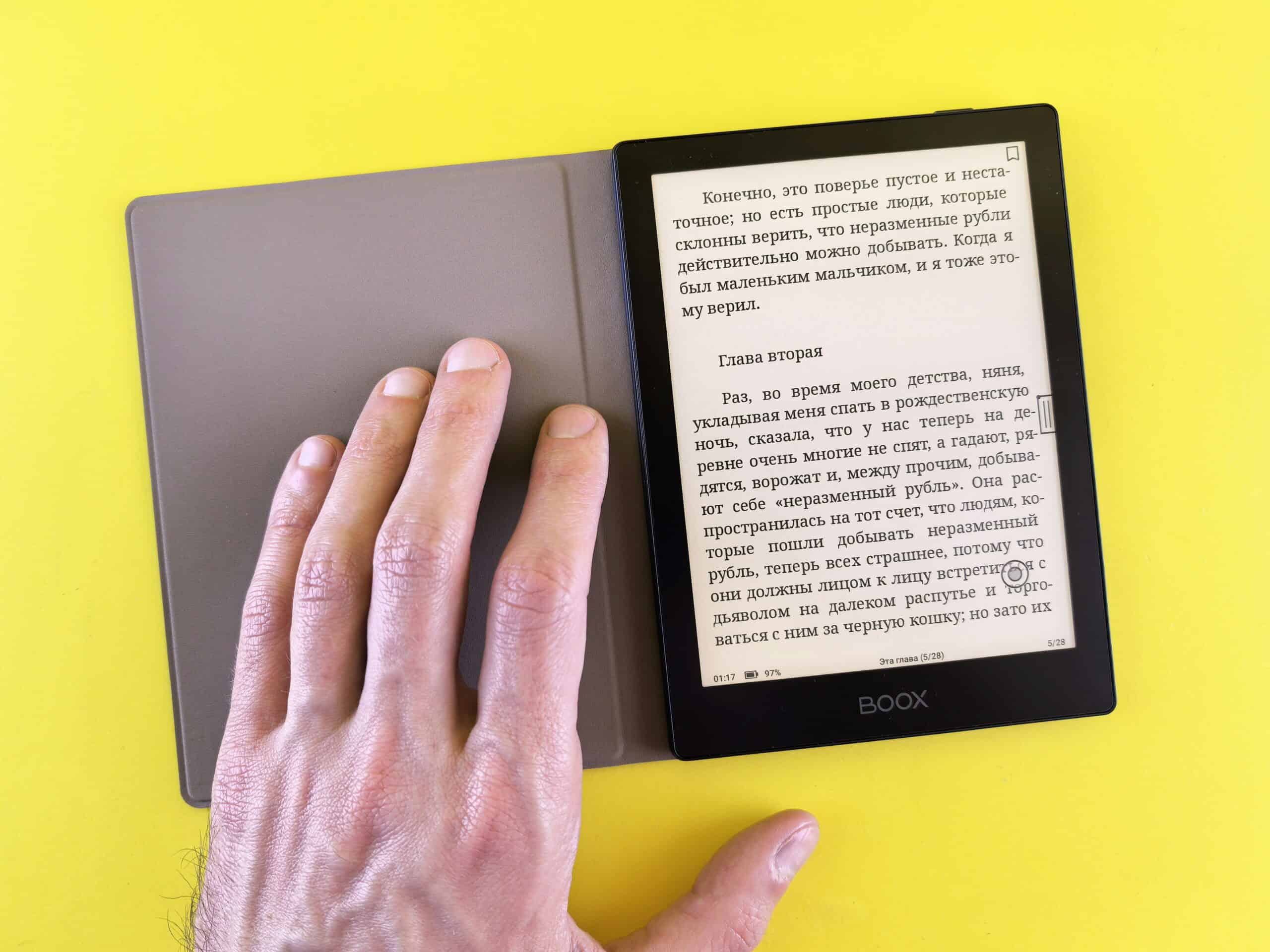
Every other fix for screen discomfort modifies a backlit display, and e ink removes the backlight instead. The best e ink devices for screen sensitivity use reflected room light the way paper does, so there is no flicker to sense and no light source pointed at your eyes. That makes them the one category on this site that changes the display rather than filtering it, and for readers who manage well on paper but not on tablets, an e reader is the obvious starting point, while e ink monitors and writing tablets extend the same idea to work.
The trade is real and worth stating plainly. Refresh is slow, color is limited or absent, and video is not usable.
Filters and lighting still matter on the screens you keep. Our guide to anti-glare screen filters covers that side.
E Ink Devices for Screen Sensitivity at a Glance
| Device | Front light | Refresh speed | Replaces | Best situation |
|---|---|---|---|---|
| Basic e reader | Optional, warm | Page turns | Reading on a tablet | Books and long documents |
| Large-format e reader | Optional | Page turns | PDFs and papers | Technical reading and markup |
| E ink writing tablet | Optional | Pen-optimized | Notebooks and note apps | Meetings and handwriting |
| E ink monitor | Optional | Slow, improving | A desktop display | Writing and code review |
| E ink phone or companion | Optional | Slow | Phone screen time | Evening and messaging |
| LCD writing slate | None | Instant | Scratch paper | Quick notes, no files |
Medical Disclaimer
This article is general information about display hardware and is not medical advice. Screen discomfort has several possible causes, including uncorrected vision problems. Anyone with new or worsening symptoms should speak with a doctor or an eye care professional rather than changing devices and hoping.
Key Points
- E ink reflects room light instead of emitting light at you.
- Front lights shine across the surface rather than out from behind it.
- Any front light can be switched off entirely in a bright room.
- Refresh is slow, so video and fast scrolling do not work.
- Color e ink exists and looks muted compared to an LCD.
- The American Academy of Ophthalmology treats digital eye strain as uncomfortable rather than damaging.
How We Picked
We compared device categories rather than individual models, because hardware refreshes yearly while the display technology moves slowly. Each section covers one format and the screen time it can realistically replace.
We ranked formats on four things: whether the light source can be turned off completely, how much of your actual screen time they absorb, refresh behavior, and whether files move in and out easily.
We excluded anything sold on blue light claims alone. The relevant property here is that e ink does not emit light toward you at all, which is a different mechanism from filtering a wavelength.
On the underlying discomfort we follow the position published by the American Academy of Ophthalmology, which describes digital eye strain as causing real symptoms without causing lasting eye damage, and recommends regular breaks from screens. The American Migraine Foundation separately lists bright or flickering light among common sensory triggers.
1. Basic E Readers
Why It Stands Out
A standard e reader is the cheapest way to move a large share of your reading off a backlit screen. For books, long articles, and saved documents, it replaces a tablet completely.
The front light can be turned fully off, leaving a surface that behaves like paper. In a well-lit room that is the most comfortable mode.
Worth Knowing
Screen sizes on basic models suit reflowable text rather than fixed layouts. A technical PDF will need zooming and panning.
Warm front light settings shift the light amber rather than removing it. Off is still off, and that option matters most.
Getting your own files on takes a cable or an email-to-device address. Setting that up once makes the device far more useful.
Best for: Books, long-form reading, and evening screen time. Skip it for PDFs with fixed layouts or anything interactive.
Check Price on Amazon2. Large-Format E Readers
Why It Stands Out
A larger panel displays a full page at readable size without reflowing, which is what fixed-layout PDFs need. Academic papers, manuals, and sheet music all become practical.
Most also accept a stylus for margin notes. Reading and annotating happen on the same non-emissive surface.
Worth Knowing
Price climbs steeply with panel size, and these cost multiples of a basic reader. Weight also becomes noticeable in one hand.
Many run a modified Android build, which brings app access and inconsistent polish. Store availability varies by model.
Handling the device matters during an attack, when holding something heavy is unwelcome. A stand solves that, and our guide to home office lighting covers the room around it.
Best for: PDFs, technical reading, and annotation. Skip it if you mostly read novels, where a basic reader is better value.
Check Price on Amazon3. E Ink Writing Tablets
Why It Stands Out
A writing-focused e ink tablet handles notes, sketches, and meeting capture with pen latency low enough to feel natural. It replaces a notebook and a note-taking app at once.
Because the surface emits no light, long note sessions do not involve staring into a lamp. Handwriting also syncs and searches on most models.
Worth Knowing
These are deliberately limited devices, with no browser worth using and few apps. That restriction is part of the appeal and a genuine limitation.
Pen tips wear and need replacing periodically. Factor that into the running cost.
Cloud sync quality varies more than hardware quality does. Check how files leave the device before committing.
Best for: Note-taking, meetings, and planning away from a backlit screen. Skip it if you need real apps or a browser.
Check Price on Amazon4. E Ink Monitors
Why It Stands Out
An e ink monitor connects to a computer like any display, which moves actual work off a backlit panel. For writing, editing, terminal work, and code review it is usable today.
Many offer refresh modes that trade ghosting against speed. Turning the front light off leaves a paper-like desktop.
Worth Knowing
These are the most expensive option here by a wide margin. Refresh is slow enough that cursor movement smears and video is out.
Most people run one alongside a conventional display rather than instead of it. Text work goes on the e ink panel, everything else stays put.
Screen height and posture still apply to any monitor. Our guide to monitor light bars covers lighting the desk without lighting the panel.
Best for: Writers, editors, and developers who spend hours on text. Skip it for design, video, or any color-critical work.
Check Price on Amazon5. E Ink Phones and Companion Devices
Why It Stands Out
Phone screens account for a large share of daily screen time, often at night in a dark room. An e ink phone or a small companion device removes the emissive display from that habit.
The limited interface also slows compulsive scrolling. Many users treat that as the main benefit.
Worth Knowing
Cameras, maps, and video are all compromised or absent. Most people carry one as a secondary device rather than a replacement.
Availability is limited and support windows are short compared to mainstream phones. Buying into a small ecosystem carries some risk.
Evening habits matter more than hardware for many people. Our guide to screen time and migraines covers what is established.
Best for: Evening messaging and cutting phone screen time. Skip it if one device has to do everything.
Check Price on Amazon6. LCD Writing Slates
Why It Stands Out
A pressure-sensitive writing slate costs very little, emits no light, and responds instantly with no refresh lag. For shopping lists, phone numbers, and quick notes it removes a reason to pick up a phone.
Battery life runs for a very long time on a coin cell. Nothing to charge and nothing to sync.
Worth Knowing
Nothing is saved. One press clears the whole surface, which makes it scratch paper rather than a notebook.
Contrast is lower than e ink and the writing is usually a single color. Fine detail does not survive.
Treat it as a companion to the devices above. It is the cheapest way to keep a bright screen out of a small task.
Best for: Quick notes and keeping a phone out of your hand. Skip it if you need to keep what you wrote.
Check Price on AmazonHow to Choose E Ink Devices for Screen Sensitivity
Which screen time do you want to replace?
Answer this before looking at hardware. Reading points to an e reader, note-taking to a writing tablet, and work to a monitor.
Buying the wrong category is the common mistake. A cheap e reader that absorbs two hours a day beats an expensive monitor you barely use.
Does the light turn fully off?
Most e ink devices include a front light, and the useful question is whether it can be switched off completely rather than dimmed. Off is the mode that makes the surface behave like paper.
Warm settings shift color and still emit. Check for a true off in the settings, not just a lowest step.
Can you live with the refresh speed?
Page turns and typing are fine. Scrolling, cursor movement, and anything animated are not.
Try to see one in person if you can. Reading about the lag conveys less than watching it.
Do you need color?
Color e ink exists and looks noticeably muted next to an LCD. For text it is irrelevant, and for charts or images it may disappoint.
Monochrome panels usually have better contrast. Most text-focused buyers are happier with them.
How do files get on and off?
Some devices are locked to one store, others accept any file over a cable or cloud folder. That single detail decides how useful the device becomes.
Check your own formats specifically. A reader that handles EPUB badly is frustrating if that is what you own.
Is your vision actually corrected?
Uncorrected or outdated prescriptions produce exactly the symptoms people blame on screens. An eye exam is the cheaper first step.
Tinted lenses are a separate question. Our guides to migraine glasses and whether blue light glasses help cover what those do.
E Ink vs Filtering Your Existing Screen
Where e ink wins
It removes the light source rather than reducing it, which is a different kind of change. No backlight means nothing to flicker and nothing aimed at your eyes.
Contrast also stays constant in bright rooms, where LCDs need more brightness to compete. Reading outdoors becomes comfortable instead of impossible.
For hours of text, this is the larger improvement. The cost is that it only covers text.
Where filtering your existing screen wins
Cost, and the fact that it applies to everything you already do. A matte filter and better room lighting change every application at once.
Your existing screen also stays fast and in color. Nothing about your workflow has to change.
Both approaches combine well. Filters and lighting handle the main display while e ink absorbs the long reading, and flicker-free bulbs cover the room light e ink depends on.
Common Misconceptions
That e ink is just a dimmer screen
It is a different mechanism. An LCD emits light through a panel toward you, and e ink reflects whatever light is already in the room off a surface of pigment.
That a front light defeats the purpose
Front lights shine across the surface rather than out from behind it, and every one can be switched off. In a lit room the off setting is the point.
That blue light is the whole story
Filtering a wavelength and removing the light source are not the same intervention. Room lighting and screen brightness usually matter more than color temperature.
That an e ink monitor can replace your display
For text work it is usable, and for anything animated or color-critical it is not. Most people run one alongside a conventional panel rather than instead of it.
That new hardware replaces breaks
The American Academy of Ophthalmology recommendation is regular breaks from screens, which no device removes the need for. E ink reduces the light load and not the duration.
Worth reading next: whether eye strain can cause migraines covers the link this whole category depends on, and eye drops for screen eye strain plus whether to wear sunglasses indoors cover two cheaper things to try alongside a hardware change, while dimmer switches and a migraine-friendly workspace handle the room an e ink screen reads by.
Frequently Asked Questions
What are the best e ink devices for screen sensitivity?
A basic e reader for books and long documents, a large-format reader for PDFs, and a writing tablet for notes. An e ink monitor extends the idea to desk work, and it costs considerably more and refreshes slowly.
Is e ink better for headaches than an LCD?
It removes the backlight rather than dimming it, so there is no light source directed at your eyes and no flicker to sense. Individual responses vary, and it is a plausible change rather than a guaranteed one.
Does the front light on an e reader cause the same problem?
A front light shines across the surface instead of out from behind it, and it can be switched off entirely. In a well-lit room, running it off gives you a genuinely paper-like surface.
Can an e ink monitor replace a normal monitor?
For writing, editing, and text-heavy work, many people find it can. Refresh is slow enough that cursor movement smears and video does not work, so most run one as a second display.
Is color e ink any good?
It works and looks muted next to an LCD, with lower contrast than monochrome panels. For text-focused reading, monochrome is usually the better choice.
Are e ink devices good for children with headaches?
They reduce the light load of reading, which is a reasonable change for any age. Children with headaches should be assessed by a doctor rather than managed with device choices.
Do e ink devices help with eye strain?
They remove glare and the emissive light source, which addresses part of the discomfort. The American Academy of Ophthalmology still recommends regular breaks, since duration matters independently of the display.
When should I see a doctor about screen-related headaches?
See a doctor if headaches are new, worsening, or more frequent, and see an eye care professional if you have not had a recent eye exam. Uncorrected vision produces the same symptoms, and no device will fix that.
Sources
- American Academy of Ophthalmology. Computers, Digital Devices and Eye Strain. https://www.aao.org/eye-health/tips-prevention/computer-usage
- American Migraine Foundation. Migraine Triggers. https://americanmigrainefoundation.org/
- National Institute of Neurological Disorders and Stroke. Migraine. National Institutes of Health. https://www.ninds.nih.gov/health-information/disorders/migraine
